 Download Plus
An iPhone screen shows every detail of a 4K video, and a large iPad screen shows even more. If you have a link to a 4K file — your own drone footage in the cloud, a 4K stock clip you licensed, a lecture recorded in high resolution — you'll want it in full quality, not a blurry copy.
This guide shows how to download 4K video on iPhone and iPad, how to choose the quality, and how to keep large files under control with Download Plus.
What you need to download 4K video
Three things decide whether you get a 4K file:
- A 4K source. The page or link must offer a video file that is actually 4K (2160 pixels tall). A download app can't add detail that isn't there.
- A direct file. Download Plus saves real video files such as MP4, MOV and M4V. Streaming services send video in small pieces and are blocked on purpose.
- Enough space and a good connection. 4K files are large, so Wi-Fi and free storage help.
Only download 4K videos you own or have permission to save.
Step 1: choose your video quality
Open Download Plus and go to Settings › Video Quality. You can choose:
| Setting | Resolution | Plan |
|---|---|---|
| Best available | The highest the page offers | Lifetime Pro |
| 4K (2160p) | 3840 × 2160 | Lifetime Pro |
| 2K (1440p) | 2560 × 1440 | Lifetime Pro |
| 1080p | 1920 × 1080 | Lifetime Pro |
| 720p | 1280 × 720 | Free |
| 480p and 360p | Smaller files | Free |
Download Plus picks the sharpest video at or below the quality you set. Choose 4K (2160p) or Best available for 4K downloads. In Settings › Video Format you can also prefer MP4, MOV, M4V or WebM when a page offers more than one.
Step 2: find the 4K video
There are three ways to start the download:
- Paste the link into the Downloads tab and tap Download.
- Open the page in the built-in browser. The Video found card shows the format, the quality (for example 2160p) and the size before you download.
- Share from Safari and choose Save to Download Plus.
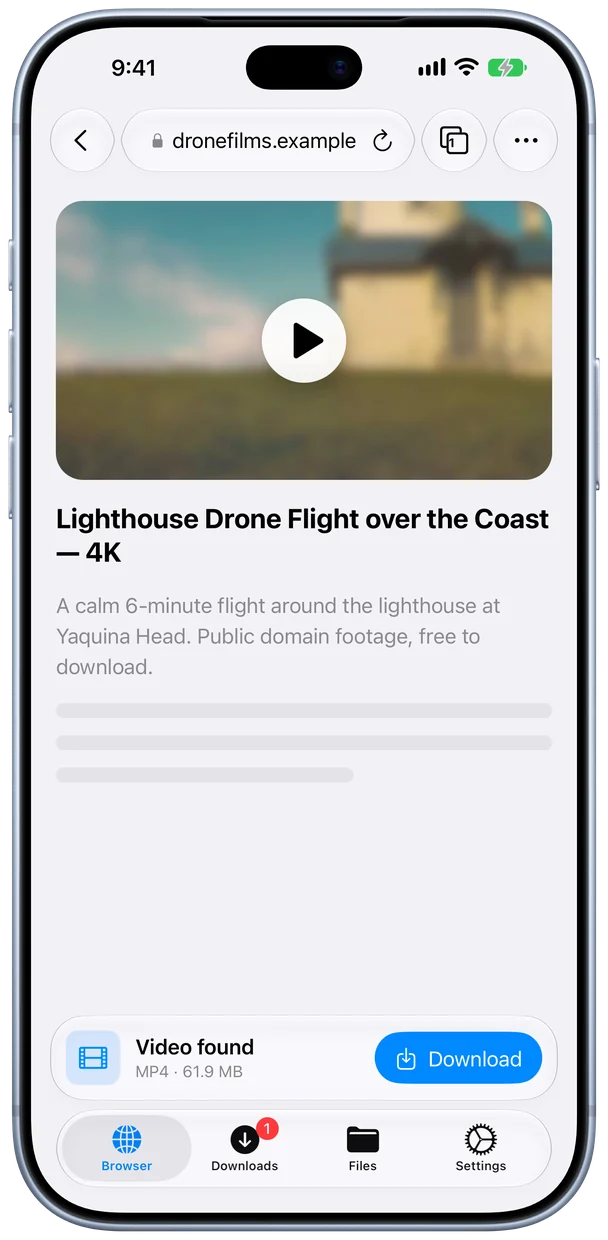
Step 3: download and watch offline
Tap Download. The Downloads tab shows progress, speed and time left, and the download keeps going in the background. If the connection drops, tap Retry and it continues from where it stopped when the server supports it.
When it's done, open Files › Videos and tap the video. 4K MP4 and MOV files play in the built-in player, with Picture in Picture so you can keep watching while you use other apps. To keep a copy in your photo library, select the video and choose Save to Photos.
How big is a 4K video?
4K files are several times larger than 1080p. The exact size depends on how the video was encoded, but a rough guide:
| Quality | Typical size for 10 minutes |
|---|---|
| 720p | 100–400 MB |
| 1080p | 300 MB – 1.5 GB |
| 4K (2160p) | 1–4 GB or more |
The Video found card shows the real size before you tap Download, so you always know what you're getting.
Tips to save space and data
- Download 4K on Wi-Fi. To avoid using mobile data, turn off Use Cellular Data in Settings.
- If you only watch on your iPhone, 1080p often looks nearly the same on a small screen and takes far less space.
- Check Settings › Storage in Download Plus to see how much space your videos use, and clear the ones you've finished.
- With iCloud Sync (Pro), your library is also available on iPad and Mac through your own iCloud Drive.
FAQ
Can I download 4K video for free?
The free plan downloads videos up to 720p. 4K, 2K and 1080p downloads are part of Lifetime Pro, a one-time purchase, not a subscription.
Why is my video not downloading in 4K?
The page may not offer a 4K file, or your quality is set lower than 4K. Check Settings › Video Quality, and look at the quality shown on the Video found card.
Can I download 4K videos from streaming or social apps?
No. Download Plus saves direct video files only. Streaming and social services are blocked to respect creators' rights and App Store rules.
Does 4K video play smoothly on iPhone?
Yes. Recent iPhones and iPads play 4K MP4 and MOV video smoothly in the built-in player.
Summary
To download 4K video on iPhone, set Settings › Video Quality to 4K or Best available, then paste the link, find the video on the page, or share it from Safari. Download on Wi-Fi, check the size on the Video found card, and watch offline with Picture in Picture. For more ways to save videos, read how to download a video from a link on iPhone.