 Download Plus
Searching the App Store for a video download app turns up dozens of results, and many look alike. Some are full of ads, some lock basic features behind a weekly subscription, and some promise downloads from services that don't allow it — which is why those apps often disappear.
This guide gives you a practical checklist for choosing a download video application for iPhone and iPad, and shows how Download Plus handles each point.
1. It downloads real video files, in the quality you want
A good video download app saves the actual video file — MP4, MOV or M4V — so it plays anywhere, with no special player. Look for:
- a choice of quality, from data-saving 360p up to 4K;
- a preview of the format, quality and size before you download;
- a preferred format setting when a page offers several.
In Download Plus, the Video found card shows all three, and Settings › Video Quality goes from 360p to 4K. Read more in how to download 4K videos on iPhone.
2. Video downloads keep going in the background
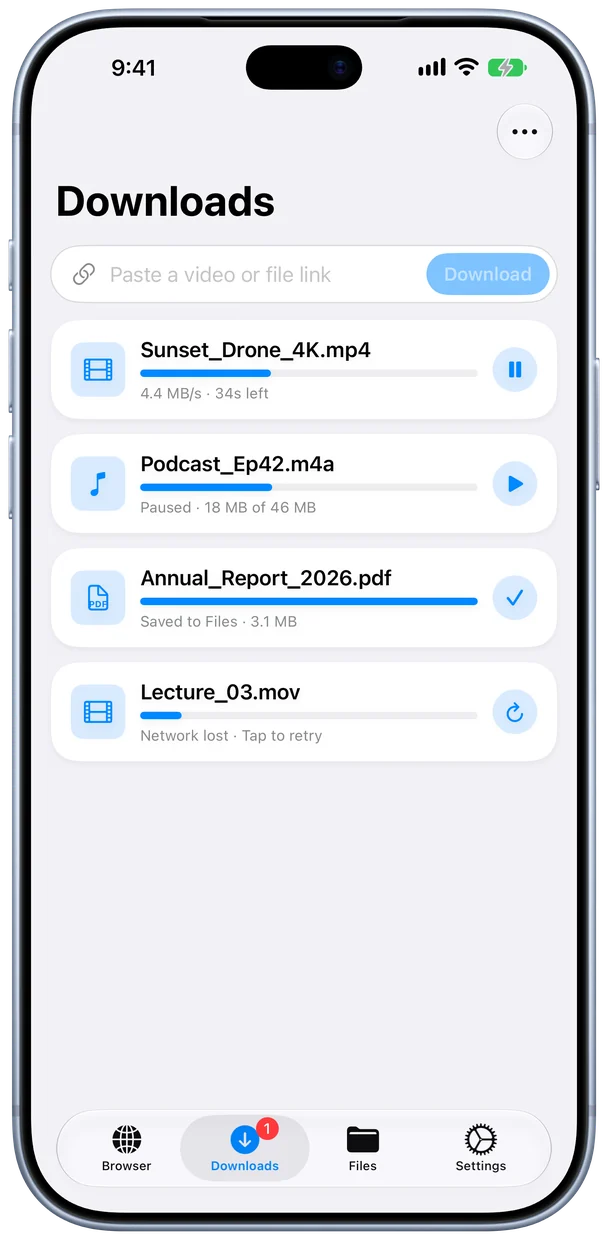
Large video downloads take time. The app should keep downloading when you switch apps or lock the screen, and let you pause, resume and retry without starting over. Download Plus shows speed and time left for every file and runs several downloads at once — two on the free plan, up to six with Lifetime Pro.
3. It plays your videos offline
The point of downloading is watching later, without signal. Check that the app has a proper player:
- Picture in Picture, so the video keeps playing in a corner while you use other apps;
- Save to Photos, to add a video to your photo library;
- a library that sorts videos into their own folder, with search and your own folders.
Download Plus plays MP4, MOV and M4V in its built-in player and keeps every video in Files › Videos, also visible in the Files app.
4. It respects your privacy
A downloads app sees the links you save, so privacy matters. Look at the App Privacy section on the App Store page. Download Plus shows Data Not Collected: no account is needed, there are no ads or analytics, and your files stay on your device or in your own iCloud Drive. You can also lock the app with Face ID or a passcode.
5. It is honest about what it can download
Be careful with apps that claim to download from any streaming or social service. Those services don't allow it, and such apps are often removed. Download Plus saves direct file links only and blocks streaming and social services on purpose. Only download videos you own or have permission to save — for example your own uploads, course recordings shared with you, or public-domain films.
6. The price is clear
| Question | Download Plus |
|---|---|
| Is it free to download? | Yes |
| What's free? | 5 video downloads up to 720p, unlimited audio, documents and other files |
| Is there a subscription? | No |
| What does Pro cost? | One-time Lifetime Pro purchase |
| What does Pro add? | Unlimited video downloads, 1080p to 4K, 6 downloads at a time, ZIP extraction, iCloud Sync |
| Family Sharing? | Yes, up to 6 family members |
FAQ
What is the best video download app for iPhone?
The best one saves real video files in the quality you choose, downloads in the background, plays offline, respects your privacy and has a clear price. Download Plus was built around those points and is free to try.
Can a video download app save videos to my Camera Roll?
Yes, if it supports it. In Download Plus, select a video and choose Save to Photos.
Do I need an account to use a video downloads app?
Not with Download Plus. Everything works without signing in.
Does it work on iPad and Mac?
Download Plus is built for iPhone, iPad, iPhone Duo, Mac and Apple Vision Pro, and one Lifetime Pro purchase covers them all. Check the App Store page for the devices available today.
Summary
Choose a video download app that saves real files up to 4K, keeps downloading in the background, plays offline with Picture in Picture, collects no data and charges once. Download Plus ticks every box. To get started, see how to download a video from a link on iPhone.